Although I think most people here know how to post photos, here is a brief tutorial for anyone who doesn't know and is too shy to ask. I filched it from another site:
It's probably better to host your photos elsewhere, such as PhotoBucket ( http://www.photobucket.com )
There are a few simple steps to the process:
1. Sign up for a photobucket account
Click here:
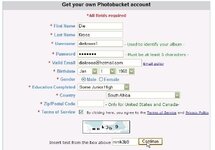
2. Prepare your photos
It is a LOT faster uploading JPEG files than BITMAP files (because they are smaller!) JPEG files usually have a file name that ends in ".jpg" and bitmap files usually have a ".bmp" extension. Some images have a ".gif" extension.
To change a bitmap or gif to a jpg, use the Paint program in Windows Accessories.
Open the .bmp file with Paint and then choose File, Save As, then type in a name and change the bottom box to say "JPEG (*.JPG, *.JPEG, *.JPE, *.JFIF)"
Also try to crop (cut the edges off) or resize (make it smaller) the image so it fits onto the page of this website. Microsoft has a program called "PhotoEditor" (photoed.exe) that will allow you to resize your photos.
3. Log in to photobucket
Click on http://www.photobucket.com if you didn't save a link!

4. Upload your photos
Follow the photobucket instructions for uploading the photo.
First, click on "Browse".
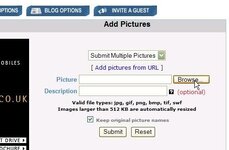
This pops up a window where you can find and select your photo. Only choose ONE photo per browse.
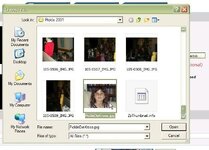
Press the "Submit" button.
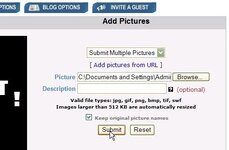
It will then tell you when your photo was successfully uploaded.
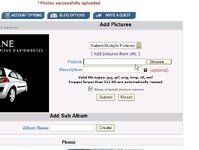
5. Post your photo here
Once your photo is uploaded, it will be displayed on the photobucket page, with three (very similar looking) boxes underneath it. The bottom box is labelled "Img". Click on the bottom box, and the contents of the box should be selected. Press Control-C to copy the text and then click in the body of a message like this one, and press Control-V.
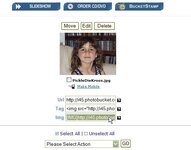
This will leave a string of text that looks like

in the message. But when people read the message, it will actually display the photo like this:

It's a lot simpler than it looks, trust me!
It's probably better to host your photos elsewhere, such as PhotoBucket ( http://www.photobucket.com )
There are a few simple steps to the process:
1. Sign up for a photobucket account
Click here:
2. Prepare your photos
It is a LOT faster uploading JPEG files than BITMAP files (because they are smaller!) JPEG files usually have a file name that ends in ".jpg" and bitmap files usually have a ".bmp" extension. Some images have a ".gif" extension.
To change a bitmap or gif to a jpg, use the Paint program in Windows Accessories.
Open the .bmp file with Paint and then choose File, Save As, then type in a name and change the bottom box to say "JPEG (*.JPG, *.JPEG, *.JPE, *.JFIF)"
Also try to crop (cut the edges off) or resize (make it smaller) the image so it fits onto the page of this website. Microsoft has a program called "PhotoEditor" (photoed.exe) that will allow you to resize your photos.
3. Log in to photobucket
Click on http://www.photobucket.com if you didn't save a link!
4. Upload your photos
Follow the photobucket instructions for uploading the photo.
First, click on "Browse".
This pops up a window where you can find and select your photo. Only choose ONE photo per browse.
Press the "Submit" button.
It will then tell you when your photo was successfully uploaded.
5. Post your photo here
Once your photo is uploaded, it will be displayed on the photobucket page, with three (very similar looking) boxes underneath it. The bottom box is labelled "Img". Click on the bottom box, and the contents of the box should be selected. Press Control-C to copy the text and then click in the body of a message like this one, and press Control-V.
This will leave a string of text that looks like
in the message. But when people read the message, it will actually display the photo like this:
It's a lot simpler than it looks, trust me!



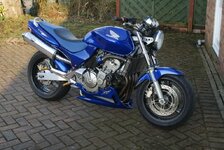

 I cant seem to be able to make it the right size in paint. how can it be so hard to get a pic from my computer as a display pic